HAP (Apple HomeKit)
INFO
This skill is outdated and will no longer be further developed! Instead, we recommend Matter as a new forward-looking standard.
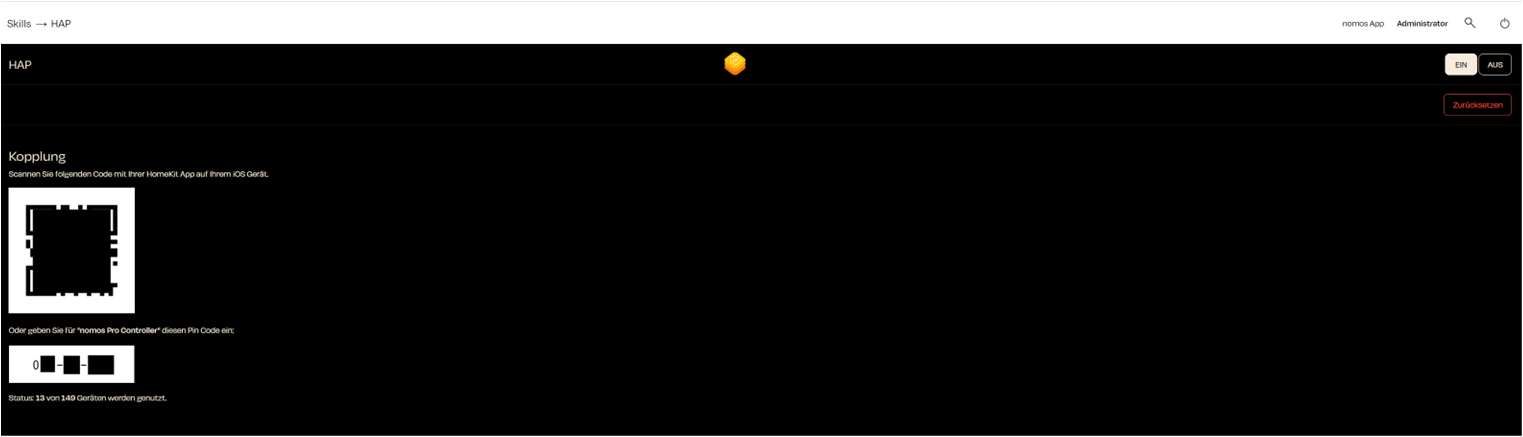
The HAP Integration (HomeKit Accessory Protocol) allows you to connect the nomos system Controller to Apple HomeKit. This is done easily by scanning a QR code with your iPhone or iPad.
Steps to Set Up:
Activate HAP:
- Make sure the switch is turned ON to activate the HAP function.
Start Pairing:
- Open the HomeKit app on your iOS device.
- Scan the QR code displayed on the screen to pair the nomos system Controller with HomeKit.
Alternatively: PIN Code:
- If you cannot scan the QR code, you can manually enter the displayed PIN code into your HomeKit app to establish the connection.
Status of Devices:
- The current status shows how many devices from the nomos platform are currently connected to Apple HomeKit. For example: “13 out of 149 devices are in use.”
Reset Pairing:
- To reset the HomeKit pairing, click the red Reset button if you want to reconfigure the connection to Apple HomeKit.
Set Up HomeKit App:
- Once the QR scan (or PIN) has been successfully paired with the HomeKit app, you can continue the integration in the Apple HomeKit app.