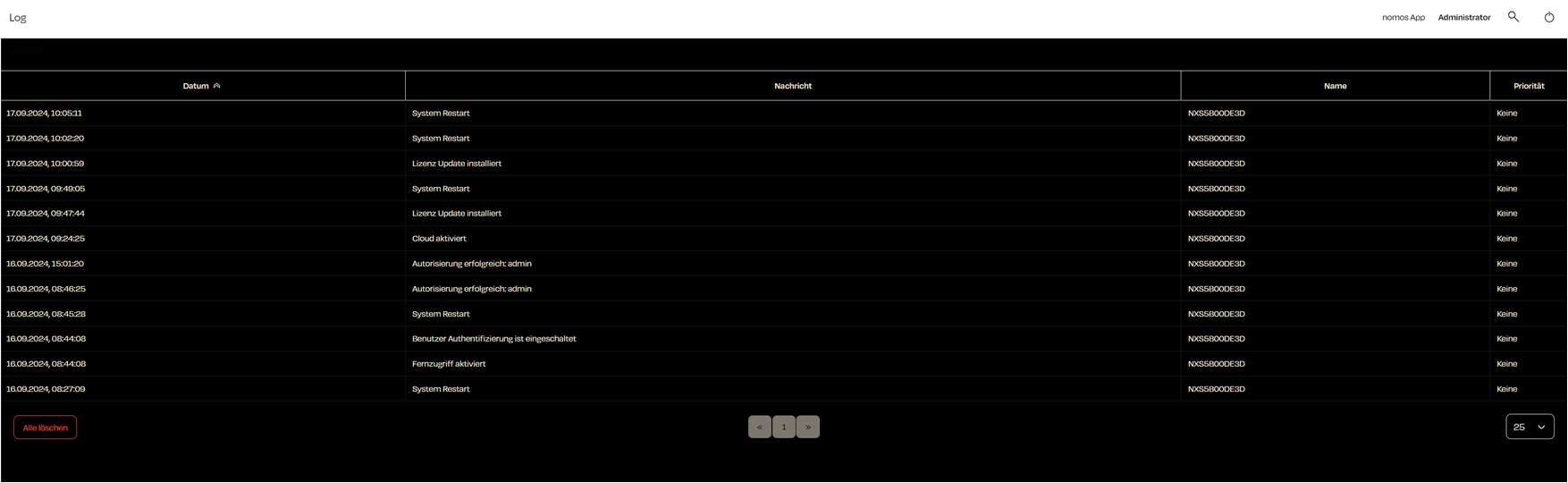
Log
The log management feature in the nomos system Controller allows you to monitor all important events, actions, and system processes. This provides an easy way to check the system status, diagnose errors, and track user actions.
Overview of Logs
In the log view, you will see all recorded events. Each row represents an event and contains the following information:
- Date & Time: When the event occurred.
- Message: A description of the event (e.g., "System Restart", "License Update Installed").
- Name: The name of the system or component that triggered the event.
- Priority: Indicates the importance of the event (e.g., "None", "Low", "High").
Functionalities
- Clear All: You can clear the entire log by clicking the "Clear All" button. This is useful for simplifying log management and removing old entries that are no longer relevant.
- Record security events: Administrators can switch the recording of security events (see below) on and off in the "Security events" section below the table.
Log Entries in Detail
Each log entry provides detailed information about various system processes, such as:
- System restarts
- Installation of updates
- Authentication attempts (successful or failed)
- Creating, changing and deleting users, and changes to permissions
- Activations or deactivations of features like remote access, VPN or cloud connectivity
- Restoring a backup, factory reset, migration of a configuration
- Pairing and unpairing of management clients
Security Events
The system entries listed above are security events: they record who logged in when and which security-relevant changes were made to the nomos system Controller. Their recording is switched on by default, also after a software update and on new controllers.
Administrators can switch the recording off with the "Record security events" checkbox in the "Security events" section below the table, for example when the log is only being used to diagnose devices. Please note:
- While the recording is paused, no system entries are written at all, so no logins, no user or permission changes and no update installations.
- Messages from devices and integrations (e.g. Home Connect, Miele, Spotify) are not affected and continue to appear in the log.
- Pausing and resuming are logged themselves ("Security event recording disabled" and "Security event recording enabled"), so the gap in the log remains traceable.
- Ticking the checkbox again resumes the recording. Existing entries are kept in both cases; they are only removed via "Clear All".
We recommend leaving the recording switched on. The log is the simplest way to spot unauthorised login attempts or unexpected changes to users and permissions.