Settings
- Settings
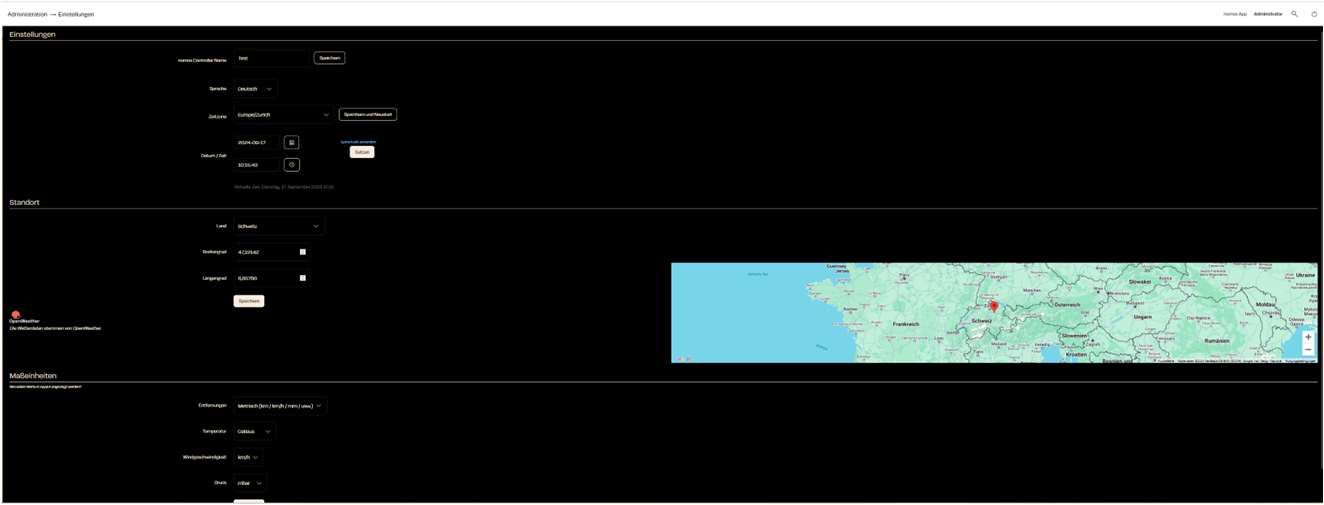
- nomos system Controller Name: Here you can set the name of the controller.
- Language: Use the dropdown menu to choose your preferred language for the user interface (e.g., German, English, French, Dutch).
- Timezone Select your time zone so that the controller functions in the correct time zone.
- Date/Time: Here you can see the current date and time. You can set these manually if necessary.
- Location
The location is used to configure the weather service (OpenWeather) correctly for displaying weather data.- Country: Choose the country where your controller is located.
- Latitude / Longitude: Enter the exact geographical coordinates for the controller's location to get accurate weather and time information..
- Weather
- Outside Temperature: Choose the device whose reading the system treats as the outside temperature. Temperature sensors, weather stations and heat pumps with an outside sensor are offered. Each entry names its room, so identically named sensors can be told apart. Leaving "Weather forecast" selected keeps using the forecast for the place configured under "Location". The choice is applied immediately.
INFO
A device missing from the list? Only devices that actually name their outside sensor are offered. Some heating controllers number their sensors (e.g. sensor_temperature_00 to _15) or carry one per heating circuit — which of them hangs outside is not something the device profile says, only the installer knows. Those devices are left out rather than offering a source that then silently delivers nothing.
Units
Select the units that should be used in the app and system.- Metric: Choose between metric (km/h, km) and imperial units (mph, mi).
- Temperature: Decide whether the temperature should be displayed in Celsius or Fahrenheit.
- Windspeed: Here you can choose between km/h, m/s, or mph.
- Pressure: Specify the units for air pressure (mbar, hPa, etc.).
Save and Restart
- After all settings are configured, you can save the changes and restart the system to apply the settings.