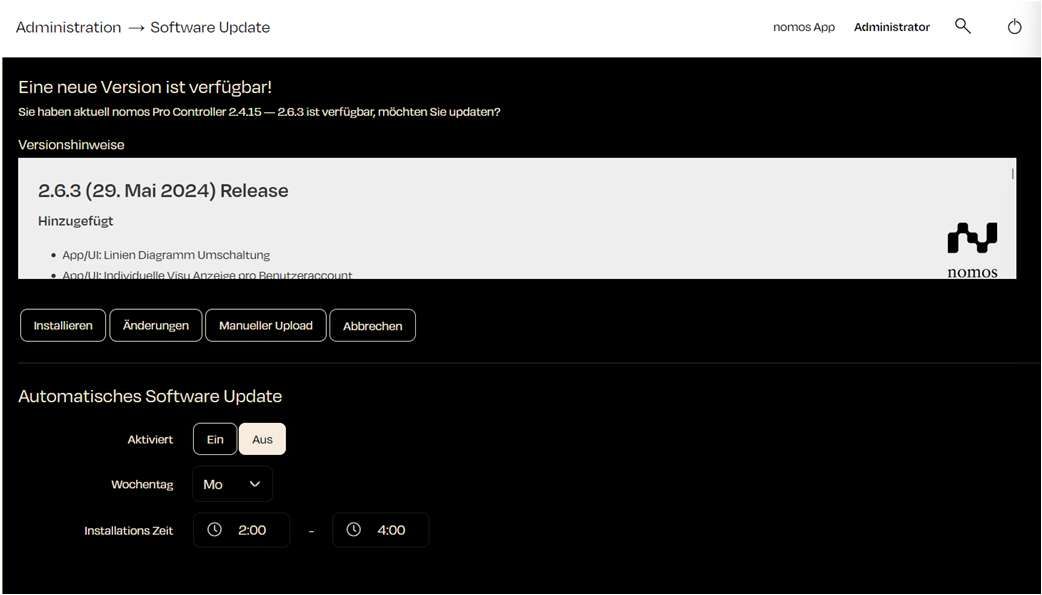
Software Update
Here, users can install new versions of the software, schedule automatic updates, and perform manual uploads.
Functions:
New Version Available:
- When a new version of the nomos software is available, it will be displayed at the top.
Buttons:
- Install: Starts the update to the new version.
- Changes: Shows detailed information about the changes in the new version.
- Manual Upload: Allows the upload of a downloaded update file to manually update the system.
- Cancel: Cancels the update process.
Security Update:
- Security updates are delivered separately from feature updates, as a patch version of the installed line (for example 3.1.1 for 3.1). When one is available, the "Security update" section shows the version, the security advisories it resolves and the planned installation.
- Install security update: Installs it right away; the system restarts afterwards.
- Postpone 7 days: Moves the automatic installation back by one week. This is possible twice at most; afterwards it is installed in the next installation window.
- An available security update is also noted in the log and reported to administrators by push notification in the app.
Automatic Software Update:
- Install security updates automatically: On by default, also after an update and on new controllers. A security update is announced a week before its installation and installed in the next installation window on the chosen weekday.
- Install all updates automatically: Additionally installs new versions with new features. Only selectable when security updates are installed automatically.
- Unticking both boxes switches the automatic off entirely; security updates then have to be installed by hand.
- Weekday: Users can select the day of the week for the automatic installation.
- Installation Time: A time frame can also be set, for example from 2:00 AM to 4:00 AM. The controller checks for updates daily within this window but installs only on the chosen weekday.
INFO
Note:
Automatic software updates can help keep the system up to date without requiring manual intervention from the user. However, it is advisable to create a backup before major updates.