Node-RED
Access and Login:
The interface is accessible through a dedicated login screen, where the integrator's username and password must be entered.

Features:
Node-RED offers the following capabilities:
- Creating automation flows using simple drag-and-drop elements.
- Managing connections and data flows between different devices and services in the nomos system.
- Integrating APIs and external services for advanced automations and scenarios.
WARNING
Important Note:
The configuration and use of Node-RED should only be performed by trained integrators. In-depth expertise is required to configure the system correctly and safely.
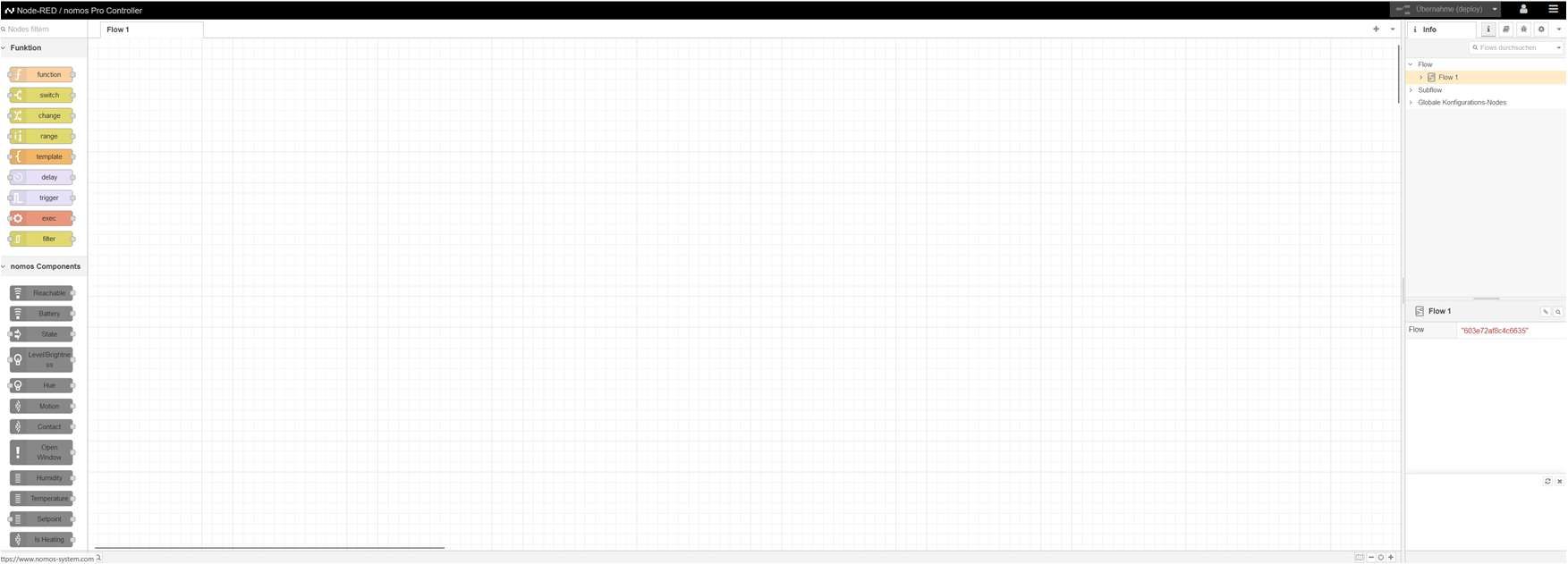
Node-RED Interface
Here you see the main interface of Node-RED when a user accesses the area. Integrators can create various flows and automations here.
Features of the Node-RED Interface:
- Left Column: A list of available functions and nomos components (such as motion sensors, temperature sensors, window contacts) that can be dragged and dropped into the flow.
- Right Area: Information about the current flow and its configuration.
- Central Workspace: The place where flows and automations are created and configured. Different blocks (nodes) can be connected here to create automated processes.
WARNING
Note:
- Important Note: This tool is intended solely for integrators who have experience with automation and programming processes. Careless use can lead to malfunctions.