

Security
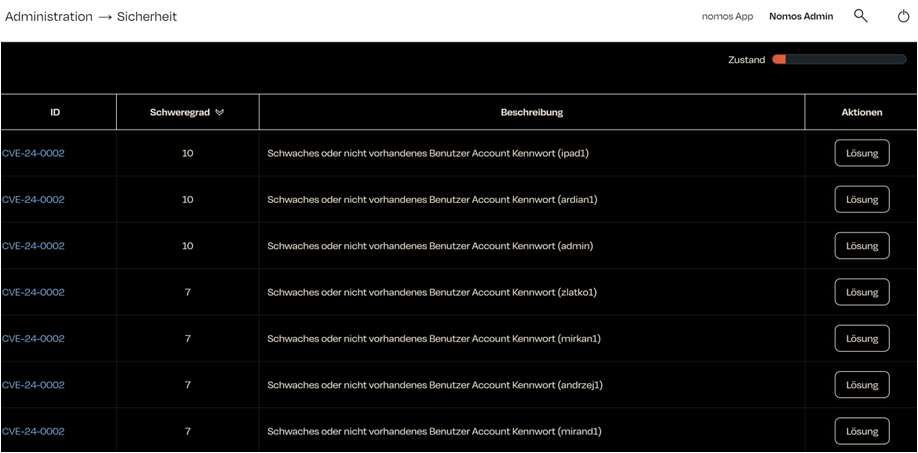
The nomos system Controller regularly conducts a security check to identify potential vulnerabilities. The results of this check are displayed in a table.
- Condition: A bar summarizes the result of the check. If nothing is found, No security issues found. Everything is OK. appears.
- ID: An identifier of the check, e.g. CVE-24-0002. It is an internal nomos identifier, not an entry in the public CVE database.
- Severity: An assessment of how serious the vulnerability is. Higher numbers (e.g., 10 in the screenshot) indicate a greater risk.
- Description: A brief explanation of the security flaw.
- Actions/Solution: For each finding, there is a Solution button that takes you to the matching configuration page.
- Automatic E-Mail Report: Below the table, Enabled switches on a weekly report by email; choose the weekday and Time.


Checks at a glance
The Condition bar follows the most severe finding. Weak passwords are reported per account: if several accounts are affected, the message appears several times.
| ID | Message | Severity | Solution opens |
|---|---|---|---|
| CVE-24-0002 | Weak or non-existent user account password (‹username›) | 10 (admin), 7 (user) | Users |
| CVE-24-0003 | Guest access activated | 4 | Users |
| CVE-24-0004 | Software Update available | 5 | Software Update |
| CVE-24-0005 | No Monitorings set up | 3 | – (see nomos System Manager) |
| CVE-24-0006 | No backup has been created for some time | 5 | Configuration |
| CVE-24-0007 | High Network Latency | 7 | Network |
| CVE-24-0008 | High CPU Temperature | 7 | Advanced |
| CVE-24-0009 | High CPU Load | 9 | Advanced |
| CVE-24-0010 | High Memory Usage | 6 | Advanced |
| CVE-24-0011 | High Storage Usage | 9 | Advanced |
| CVE-24-0012 | MQTT broker has no authentication configured | 8 | MQTT |
Checks and how to fix them
CVE-24-0002
Checks: whether an enabled user account has no password, a password identical to the username, or a common default password. Disabled accounts are not checked.
Why: Passwords like these are the first ones tried in an attack. An account in the "admin" group has full access to the installation, which is why the severity is highest there.
Fix: Under Users, open the account named in the message with Edit. Tick Change Password, enter the current password under Old Password and a strong new one under New Password, and apply it with Save. Switch off an account nobody needs any more under Status with Enabled, or delete it. Before handing over to the customer, Setup for new User gives the new accounts random passwords.
CVE-24-0003
Checks: whether the guest user "guest" is enabled.
Why: With the guest user enabled, the app offers a login without a password. Anyone on the network can then operate the installation within the guest user's permissions.
Fix: Under Users, click the status icon in the first column of the "guest" row; this disables the guest user. If you still need it, restrict its permissions to the minimum. When you switch on Remote Access, the controller also offers to disable it.
CVE-24-0004
Checks: whether newer software is available for the controller.
Why: Updates close known security vulnerabilities. An outdated controller remains open to them.
Fix: Install the update under Software Update with Install Update or Install security update. Keep Install security updates automatically switched on so that security updates are applied without your intervention.
CVE-24-0005
Checks: whether at least one monitoring is set up. A monitoring reports by push or email when devices are no longer reachable.
Why: Without monitoring, a device failure goes unnoticed until someone tries to operate the device. The finding is a notice with low severity.
Fix: Set up a monitoring for the controller in the nomos System Manager: in the Monitoring tab with a name, the devices to watch, the waiting time before a report and the recipients. The controller's configuration has no page of its own for this, which is why the finding offers no Solution button. Alternatively, create monitorings through MCP (tool monitoring_add).
CVE-24-0006
Checks: whether a configuration backup has been created in the last 120 days. A backup that has since been deleted also counts.
Why: Without a recent backup, everything set up since the last backup is lost after a hardware fault or an accidental reset.
Fix: Under Configuration, enter a name at Backup Configuration and click Backup. Keep the file somewhere other than the controller.
CVE-24-0007
Checks: the response time to the internet. The controller pings several well-known destinations; if even the fastest answer takes one second or longer, the finding appears. If no destination answers, there is no finding.
Why: A slow connection delays remote access, cloud services, notifications and updates, and points to a disturbed or overloaded network connection.
Fix: Check the settings under Network, especially Router, DNS Server 1 and DNS Server 2, as well as the router, cabling and internet line. The connections the controller needs are listed under System Requirements.
CVE-24-0008
Checks: whether the processor temperature is 85 °C or higher.
Why: Constant heat shortens the life of the hardware; the processor throttles itself, and the controller may fail.
Fix: The current temperature is shown under Advanced in the Performance section at CPU. Make sure the installation site, for example the distribution board, is adequately ventilated and away from heat sources. If the load is high at the same time, fix CVE-24-0009 first.
CVE-24-0009
Checks: whether the average system load over the last 15 minutes is 0.9 or higher.
Why: A permanently busy controller responds with a delay; automations and commands run late or not at all.
Fix: The current load is shown under Advanced in the Performance section at CPU. Common causes are automations that trigger each other or demanding Node-RED flows. The output under Internal Service shows what the controller is currently processing; Restart restarts the internal service.
CVE-24-0010
Checks: whether 15 % or less of the memory is free.
Why: When memory runs short, the system ends processes; services then fail or restart.
Fix: Memory usage is shown under Advanced in the Performance section at RAM. Check Node-RED flows and camera streams open at the same time. If the value stays high, restart the internal service under Internal Service with Restart.
CVE-24-0011
Checks: whether 15 % or less of the data storage is free.
Why: When the data storage is full, the controller can no longer write its configuration, recordings and updates.
Fix: Storage usage is shown under Advanced in the Performance section at Storage. Remove files that are no longer needed, for example old projects in the Project Editor. If the value stays high, contact support.
CVE-24-0012
Checks: whether the built-in MQTT broker is switched on and accepts connections without a username and password.
Why: Without authentication, any device on the network can read values and send commands to the controller.
Fix: Under MQTT, tick Authentication, enter a Username and Password, and apply both with Save. Then enter the same credentials in your own MQTT clients.
Additional Security Measures
- Regular Security Checks: Schedule regular security reviews, for example with the weekly report under Automatic E-Mail Report.
- Firewall Configuration: Set up your firewall to prevent unauthorized access to the nomos system Controller. The ports and connections the controller uses are listed under System Requirements.
- Network Security: Protect your network with strong passwords and other security measures.
- Access Control: Make sure that only authorized individuals have access to the nomos system Controller.