> For the complete documentation index, see [llms.txt](https://documentation.nomos-system.com/nomos-system/llms.txt). Markdown versions of documentation pages are available by appending `.md` to page URLs; this page is available as [Markdown](https://documentation.nomos-system.com/nomos-system/integratore-it/stanze/panoramica-stanze-e-dispositivi.md).
# Panoramica stanze e dispositivi
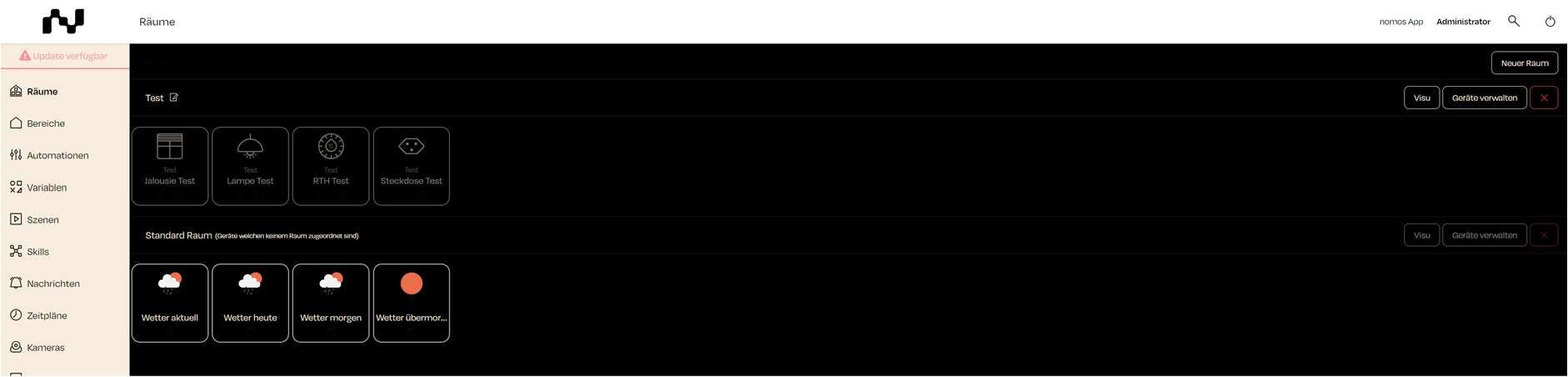
Nel dashboard del nomos system Controller è possibile mantenere facilmente una panoramica delle stanze e dei dispositivi ad esse assegnati. Questa interfaccia mostra quali dispositivi sono organizzati in quali stanze e consente una gestione semplice delle assegnazioni.
**Panoramica della schermata:**
1. **Gestisci Stanze:**
* Sul lato sinistro del dashboard si trova il menu "**Stanze**", che mostra una panoramica delle stanze create.
* Nell'esempio, è stata creata la stanza "**Test**", con i corrispondenti dispositivi assegnati.
2. **Dispositivi nelle stanze:**
* Ogni stanza mostra i dispositivi assegnati sotto forma di riquadri. Per la stanza "Test" sono stati assegnati i seguenti dispositivi:
* Jalousie Test (Oscuramento finestre)
* Lampe Test (Illuminazione)
* RTH Test (Termostati)
* Steckdose Test (Illuminazione)
* Ogni dispositivo mostra il suo tipo al di sotto (ad es. Illuminazione, Termostati).
3. **Stanza predefinita:**
* La **stanza predefinita** contiene i dispositivi che non sono stati assegnati a una stanza specifica. In questo esempio, si tratta dei dati meteo:
* Meteo attuale
* Meteo oggi
* Meteo domani
* Meteo dopodomani
* Questi dispositivi vengono automaticamente posizionati nella stanza predefinita finché non vengono assegnati a un'altra stanza.
4. **Gestione stanze e dispositivi:**
* Accanto a ogni stanza ci sono pulsanti per "**Visu**" (Visualizzazione) e "**Gestisci Dispositivi.**"
* **"Visu"** fornisce una rappresentazione visiva della stanza e dei suoi dispositivi.
* **"Gestisci Dispositivi"** consente di aggiungere o rimuovere dispositivi all'interno della rispettiva stanza.
* Clicchi la "X" per eliminare una stanza se non è più necessaria.
{% hint style="info" %}
**Note:**
* I dispositivi possono essere spostati in modo flessibile tra le stanze. È possibile aggiungere o rimuovere dispositivi in qualsiasi momento per adattare l'organizzazione delle stanze.
* Le stanze sono utili per ottimizzare automazioni e scene specifiche che possono essere applicate a questi dispositivi.
{% endhint %}
---
# Agent Instructions
This documentation is published with GitBook. GitBook is the documentation platform designed so that both humans and AI agents can read, navigate, and reason over technical content effectively. Learn more at gitbook.com.
## Querying This Documentation
If you need additional information that is not directly available in this page, you can query the documentation dynamically by asking a question.
Perform an HTTP GET request on the current page URL with the `ask` query parameter, and the optional `goal` query parameter:
```
GET https://documentation.nomos-system.com/nomos-system/integratore-it/stanze/panoramica-stanze-e-dispositivi.md?ask=&goal=
```
`ask` is the immediate question: it should be specific, self-contained, and written in natural language.
`goal` is optional and describes the broader end goal you are ultimately trying to accomplish on behalf of the user. GitBook uses it to tailor the answer towards what is most useful for that goal.
The response will contain a direct answer to the question and relevant excerpts and sources from the documentation.
Use this mechanism when the answer is not explicitly present in the current page, you need clarification or additional context, or you want to retrieve related documentation sections.