> For the complete documentation index, see [llms.txt](https://documentation.nomos-system.com/nomos-system/llms.txt). Markdown versions of documentation pages are available by appending `.md` to page URLs; this page is available as [Markdown](https://documentation.nomos-system.com/nomos-system/integrator-nl/administratie/software-update.md).
# Software-update
Hier kunnen gebruikers nieuwe versies van de software installeren, automatische updates plannen en handmatige uploads uitvoeren.
**Functies:**
* **Nieuwe versie beschikbaar:**
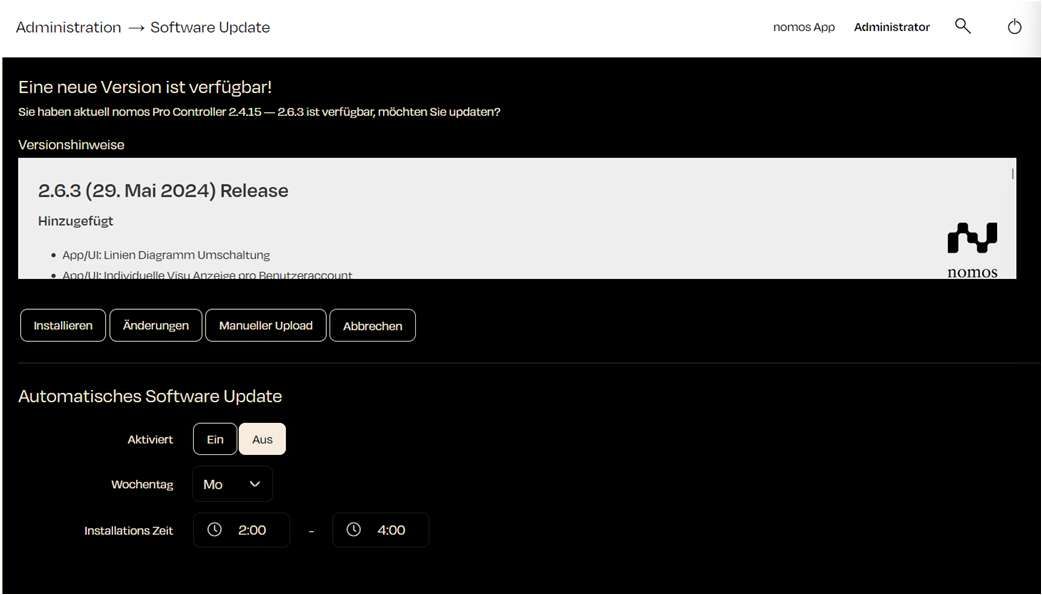
* Wanneer er een nieuwe versie van de nomos software beschikbaar is, wordt deze bovenaan weergegeven.
* **Knoppen:**
* **Installeren:** Start de update naar de nieuwe versie.
* **Wijzigingen:** Laat gedetailleerde informatie zien over de wijzigingen in de nieuwe versie.
* **Handmatige upload:** Maakt het mogelijk om een gedownloade updatebestand te uploaden om het systeem handmatig bij te werken.
* **Annuleren:** Stopt het updateproces.
* **Beveiligingsupdate:**
* Beveiligingsupdates worden los van functie-updates geleverd, als patchversie van de geïnstalleerde lijn (bijvoorbeeld 3.1.1 voor 3.1). Is er een beschikbaar, dan toont de sectie “Beveiligingsupdate” de versie, de verholpen beveiligingsmeldingen en de geplande installatie.
* **Beveiligingsupdate installeren:** Installeert deze direct; het systeem start daarna opnieuw.
* **7 dagen uitstellen:** Verschuift de automatische installatie een week. Dit kan maximaal twee keer; daarna wordt in het volgende installatievenster geïnstalleerd.
* Een beschikbare beveiligingsupdate wordt ook in het log vermeld en aan beheerders gemeld via een pushmelding in de app.
* **Automatische software-update:**
* **Beveiligingsupdates automatisch installeren:** Standaard ingeschakeld, ook na een update en op nieuwe controllers. Een beveiligingsupdate wordt een week voor de installatie aangekondigd en in het volgende installatievenster op de gekozen weekdag geïnstalleerd.
* **Alle updates automatisch installeren:** Installeert daarnaast nieuwe versies met nieuwe functies. Alleen te kiezen als beveiligingsupdates automatisch worden geïnstalleerd.
* Wie beide vakjes uitvinkt, schakelt de automatiek volledig uit; beveiligingsupdates moeten dan handmatig worden geïnstalleerd.
* **Weekdag:** De gebruiker kan kiezen op welke dag van de week updates automatisch moeten worden geïnstalleerd.
* **Installatietijd:** De periode kan ook worden vastgesteld, bijvoorbeeld van **02:00 uur tot 04:00 uur**. De controller controleert dagelijks binnen deze periode op updates, maar installeert alleen op de gekozen weekdag.
{% hint style="info" %}
**Opmerking:**
Automatische software-updates kunnen helpen om het systeem altijd up-to-date te houden, zonder dat de gebruiker handmatig hoeft in te grijpen. Het is echter raadzaam om voor grotere updates een back-up van de gegevens te maken.
{% endhint %}
---
# Agent Instructions
This documentation is published with GitBook. GitBook is the documentation platform designed so that both humans and AI agents can read, navigate, and reason over technical content effectively. Learn more at gitbook.com.
## Querying This Documentation
If you need additional information that is not directly available in this page, you can query the documentation dynamically by asking a question.
Perform an HTTP GET request on the current page URL with the `ask` query parameter, and the optional `goal` query parameter:
```
GET https://documentation.nomos-system.com/nomos-system/integrator-nl/administratie/software-update.md?ask=&goal=
```
`ask` is the immediate question: it should be specific, self-contained, and written in natural language.
`goal` is optional and describes the broader end goal you are ultimately trying to accomplish on behalf of the user. GitBook uses it to tailor the answer towards what is most useful for that goal.
The response will contain a direct answer to the question and relevant excerpts and sources from the documentation.
Use this mechanism when the answer is not explicitly present in the current page, you need clarification or additional context, or you want to retrieve related documentation sections.