> For the complete documentation index, see [llms.txt](https://documentation.nomos-system.com/nomos-system/llms.txt). Markdown versions of documentation pages are available by appending `.md` to page URLs; this page is available as [Markdown](https://documentation.nomos-system.com/nomos-system/integrator-nl/administratie/instellingen.md).
# Instellingen
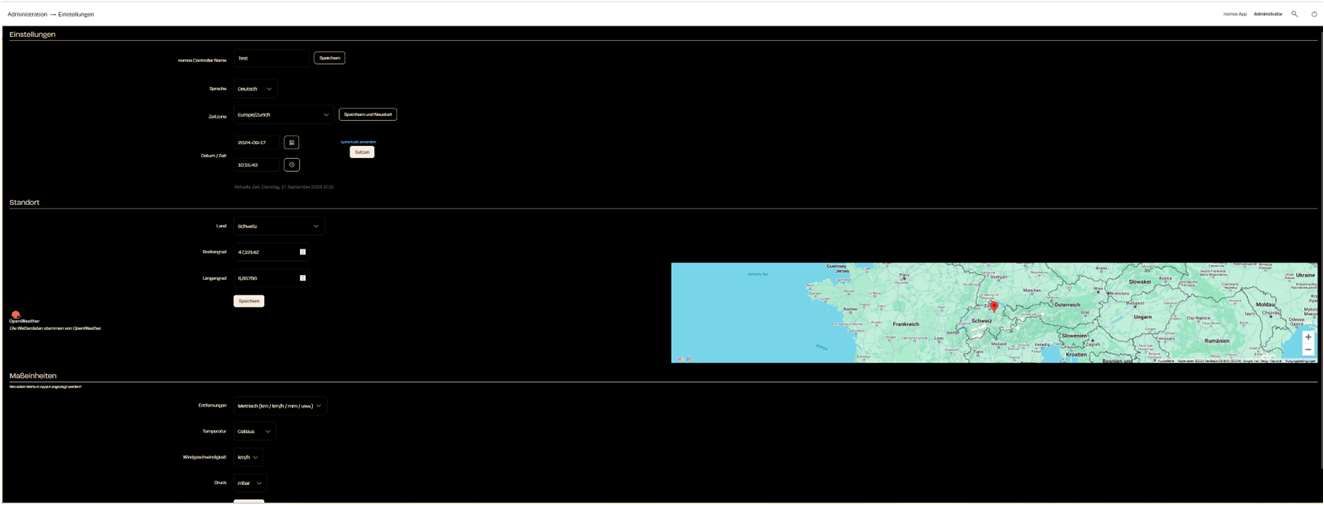
1. **Instellingen**
* **nomos system Controller Naam:** Hier kunt u de naam van de controller instellen.
* **Taal:** Via het dropdown-menu kunt u de voorkeurstaal voor de gebruikersinterface selecteren (bijv. Duits, Engels, Frans, Nederlands).
* **Tijdzone:** Kies uw juiste tijdzone, zodat de controller in de juiste tijdzone werkt.
* **Datum/Tijd:** Hier ziet u de actuele datum en tijd. U kunt deze handmatig instellen indien nodig.
2. **Locatie**\
De locatie wordt gebruikt om de weerdienst (OpenWeather) correct in te stellen voor het weergeven van de weersgegevens.
* **Land:** Kies het land waar uw controller zich bevindt.
* **Breedtegraad / Lengtegraad:** Vul de exacte geografische coördinaten voor de locatie van de controller in om nauwkeurige weer- en tijdinformatie te ontvangen.
3. **Weer**
* **Buitentemperatuur:** Kies het apparaat waarvan de meetwaarde binnen het systeem als buitentemperatuur geldt. Temperatuursensoren, weerstations en warmtepompen met een buitenvoeler worden aangeboden. Achter elk apparaat staat de ruimte, zodat sensoren met dezelfde naam te onderscheiden blijven. Blijft **"Weersverwachting"** geselecteerd, dan wordt de verwachting voor de onder "Locatie" ingestelde plaats gebruikt. De keuze wordt direct toegepast.
{% hint style="info" %}
**Ontbreekt er een apparaat in de lijst?** Alleen apparaten die hun buitenvoeler ook daadwerkelijk benoemen worden aangeboden. Sommige verwarmingsregelaars nummeren hun voelers (bijv. `sensor_temperature_00` tot `_15`) of hebben er één per verwarmingscircuit — welke daarvan buiten hangt, blijkt niet uit het apparaatprofiel; alleen de installateur weet dat. Die apparaten blijven daarom buiten beschouwing, in plaats van een bron aan te bieden die vervolgens stilzwijgend niets levert.
{% endhint %}
4. **Eenheden**\
Kies de eenheden die in de app en het systeem gebruikt moeten worden.
* **Afstand:** Kies tussen metrische (km/u, km) en imperiale eenheden (mph, mijl).
* **Temperatuur:** Beslis of de temperatuur in Celsius of Fahrenheit moet worden weergegeven.
* **Wind snelheid:** Hier kunt u kiezen tussen km/u, m/s of mph.
* **Druk:** Bepaal de eenheden voor luchtdruk (mbar, hPa, etc.).
5. **Systeem Opslaan en Herstarten**
* Nadat alle instellingen zijn geconfigureerd, kunt u de wijzigingen opslaan en het systeem herstarten om de instellingen toe te passen.
---
# Agent Instructions
This documentation is published with GitBook. GitBook is the documentation platform designed so that both humans and AI agents can read, navigate, and reason over technical content effectively. Learn more at gitbook.com.
## Querying This Documentation
If you need additional information that is not directly available in this page, you can query the documentation dynamically by asking a question.
Perform an HTTP GET request on the current page URL with the `ask` query parameter, and the optional `goal` query parameter:
```
GET https://documentation.nomos-system.com/nomos-system/integrator-nl/administratie/instellingen.md?ask=&goal=
```
`ask` is the immediate question: it should be specific, self-contained, and written in natural language.
`goal` is optional and describes the broader end goal you are ultimately trying to accomplish on behalf of the user. GitBook uses it to tailor the answer towards what is most useful for that goal.
The response will contain a direct answer to the question and relevant excerpts and sources from the documentation.
Use this mechanism when the answer is not explicitly present in the current page, you need clarification or additional context, or you want to retrieve related documentation sections.