> For the complete documentation index, see [llms.txt](https://documentation.nomos-system.com/nomos-system/llms.txt). Markdown versions of documentation pages are available by appending `.md` to page URLs; this page is available as [Markdown](https://documentation.nomos-system.com/nomos-system/integrator-nl/administratie/beveiliging.md).
# Beveiliging
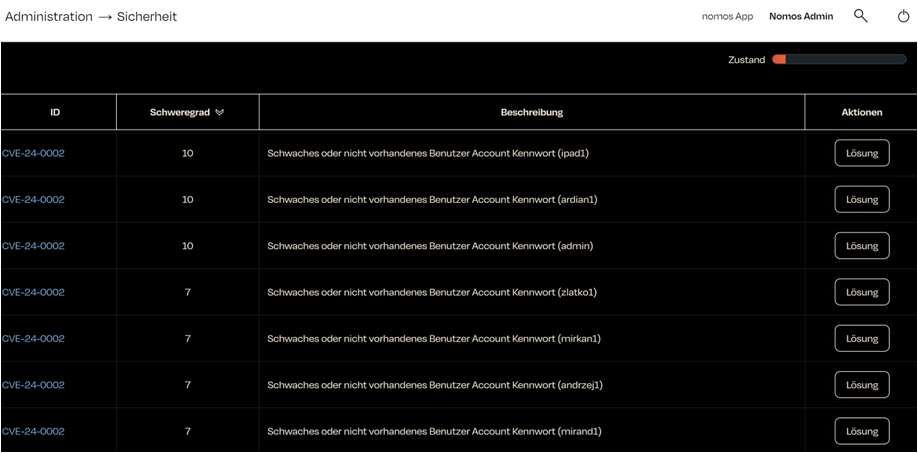
De nomos system Controller voert regelmatig een veiligheidscontrole uit om potentiële kwetsbaarheden te identificeren. De resultaten van deze controle worden in een tabel weergegeven.
* **ID (CVE):** Dit is een unieke identificatie (Common Vulnerabilities and Exposures) van de kwetsbaarheid. CVE-24-0002 wijst op een specifiek probleem.
* **Ernst:** Dit is een beoordeling van de ernst van de kwetsbaarheid. Hogere cijfers (bijvoorbeeld 10 in de schermafbeelding) betekenen een hoger risico.
* **Beschrijving:** Een korte beschrijving van de kwetsbaarheid.
* **Acties/Oplossing:** Voor elke kwetsbaarheid is er een knop "Oplossing" die u helpt om de invoer te voltooien of te verbeteren.
**Behandeling van kwetsbaarheden (Algemene tips):**
De knop "Oplossing" voor elke kwetsbaarheid leidt u naar de volgende stappen:
* **Wachtwoord wijzigen:** Wijzig het aangetaste wachtwoord.
* **Gebruikersaccount deactiveren/verwijderen:** Als een gebruikersaccount niet meer nodig is, kan het worden gedeactiveerd of volledig verwijderd.
* **Software-updates:** Zorg ervoor dat de nomos system Controller up-to-date is.
**Aanvullende veiligheidsmaatregelen:**
* **Regelmatige veiligheidscontroles:** Plan regelmatige veiligheidscontroles in.
* **Firewall-configuratie:** Configureer uw firewall om ongeautoriseerde toegang tot de nomos system Controller te voorkomen.
* **Netwerkbeveiliging:** Bescherm uw netwerk met sterke wachtwoorden en andere veiligheidsmaatregelen.
* **Toegangscontrole:** Zorg ervoor dat alleen bevoegde personen toegang hebben tot de nomos system Controller.
---
# Agent Instructions
This documentation is published with GitBook. GitBook is the documentation platform designed so that both humans and AI agents can read, navigate, and reason over technical content effectively. Learn more at gitbook.com.
## Querying This Documentation
If you need additional information that is not directly available in this page, you can query the documentation dynamically by asking a question.
Perform an HTTP GET request on the current page URL with the `ask` query parameter, and the optional `goal` query parameter:
```
GET https://documentation.nomos-system.com/nomos-system/integrator-nl/administratie/beveiliging.md?ask=&goal=
```
`ask` is the immediate question: it should be specific, self-contained, and written in natural language.
`goal` is optional and describes the broader end goal you are ultimately trying to accomplish on behalf of the user. GitBook uses it to tailor the answer towards what is most useful for that goal.
The response will contain a direct answer to the question and relevant excerpts and sources from the documentation.
Use this mechanism when the answer is not explicitly present in the current page, you need clarification or additional context, or you want to retrieve related documentation sections.